This Portfolio Website
A solo, hand-coded site—no React—meant to show how I think about layout and motion and that I can ship it myself. It started as a Bootstrap 5 pass for speed, then became a full custom CSS rebuild with vanilla JavaScript (canvas, interactions, résumé page behavior), living on GitHub Pages next to static case studies for my other projects.
What this site had to prove
I needed one place that reads as mine: clear hierarchy, honest project storytelling, and enough interaction craft to show I’m not only comfortable in Figma—I can implement. It also had to host long-form case studies without a CMS, stay fast enough to scroll comfortably, and respect basics like keyboard use and reduced motion where it mattered.
- Signal — Work first, personality second; recruiters can scan projects and drill into case studies.
- Build credibility — Real JS (canvas, nav, small motion), not a static theme swap.
- Evolution visible — Bootstrap chapter archived; current build is the default story.
- Low ops — Static HTML/CSS/JS on Pages—no build step required for the portfolio itself.
Ship fast, learn the constraints
The first public versions used Bootstrap 5 so I could get online quickly with a responsive grid and familiar components. I still started from Figma (low- and high-fi wireframes) so layout decisions weren’t random—Bootstrap was scaffolding, not the whole idea.
That stack was fine for a first impression, but it never felt like my handwriting: utility classes and default chrome fought the direction I wanted. I froze that era in a legacy demo and a pinned file on GitHub so the “before” stays inspectable.
Shipped — interface
Bootstrap-era homepage (screenshot)
What actually shipped in the first chapter—light layout, hero, and Bootstrap scaffolding—before the custom rebuild.

Legacy ↗Bootstrap-era homepage — same look as the archived demo
Process — diagram
V1 process (Bootstrap chapter)
From problem framing through Figma wireframes, Bootstrap implementation, testing across viewports, and deploy to GitHub Pages—the path that got a credible first site live while I was still iterating on what “my” portfolio should feel like.
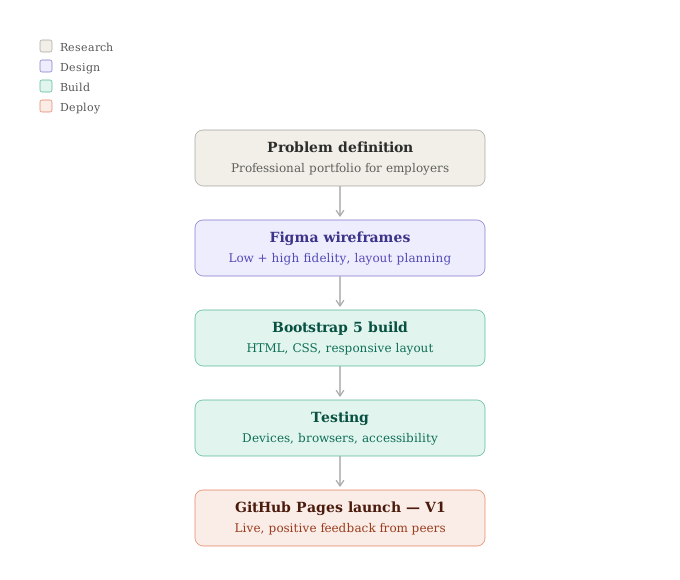
Scroll inside the display to view the full diagram
Process ↗Bootstrap era — wireframes to hosted demo
Context: This is the disciplined “get something real online” loop—not the final aesthetic I wanted long term. Pair with the screenshot above: the diagram is the plan; the monitor shows what went live in the Bootstrap chapter.
Own the CSS, own the details
Once the gap was obvious, I removed Bootstrap and rewrote the shell: navigation, section rhythm, project rows, buttons, and breakpoints in my own CSS so the site could match my Figma direction. On top of that I layered the pieces that sell the craft—canvas background, entrance motion, scroll-driven reveals, desktop cursor treatment, draggable hero crystal, and dedicated behavior on the résumé page—kept in plain JavaScript on purpose so the source stays readable.
The revamp is one large commit on GitHub; the Selected Work panel on the home page stays short on purpose so this case study can carry the narrative without repeating every bullet twice.
Shipped — interface
Current homepage (screenshot)
What shipped after the custom rebuild—hero, grid background, crystal, and the interaction layer described above.

Live ↗Current build — homepage hero as shipped
Process — diagram
V2 process (custom site)
After identifying how generic the Bootstrap pass felt, I stripped the framework, rebuilt layout and motion in custom CSS, added the JS layer I cared about, verified across browsers, and shipped the current GitHub Pages build—the site you’re reading now.
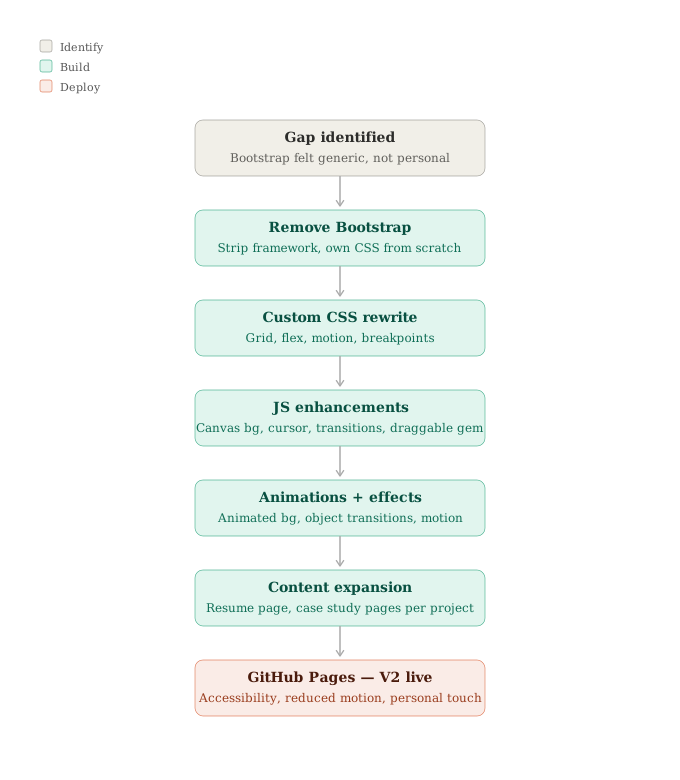
Scroll inside the display to view the full diagram
Process ↗Custom rebuild — framework out, handwriting in
Context: Same rhythm as version one. Pair with the screenshot above: the diagram is the plan; the monitor capture is what’s live today.
How it’s put together
Each case study is its own HTML file sharing the same visual language; assets live under images/ with per-project folders where it keeps things tidy. Global styles and section patterns live in index.html (this repo is intentionally simple—no bundler for the portfolio itself).
JavaScript is split by concern: background canvas and particles, scroll reveal for project rows, accordion-style project panels, mobile navigation, optional cursor styling on wide viewports, hero crystal drag logic, and resume-fx.js for the résumé page. I kept prefers-reduced-motion in mind for the heaviest motion paths.
“Meta-lesson: the portfolio and the case studies ship the same way—static files on Pages—so every link I give a recruiter actually resolves. If it breaks here, I notice immediately.”
What this demonstrates
This repo is both the artifact and the proof: I can carry a visual direction into hand-authored markup and CSS, add purposeful JS, and document other work in matching case studies—without reaching for a framework just to move pixels.